


Best Practices for Setting Database Autogrowth Size
Category: Reliability
What Is Database Autogrowth in SQL Server?
This is a procedure used by the SQL Server engine to expand a database’s size once it runs out of space.
If the autogrowth setting for a database isn’t configured correctly, that database can experience frequent, or even excessive, autogrowth events.
Whenever SQL Server needs to grow a file, all operations pause. They wait for the file-growth operation to finish before continuing.
These events can cause unpredictable performance hits at random times (especially if the disks are slow).
How Do You Configure the Settings?
A good practice is to change all database file growth options from a percentage value, or a low fixed number like 1MB, to a sufficiently large MB value.
You can use the following query to generate a change script:
- Change the [XXX] growth increment to a value large enough to avoid performance penalties.
SELECT 'ALTER DATABASE [' + db_name(s.database_id) + ']

MODIFY FILE ( NAME = N''' + s.name + ''', FILEGROWTH = XXXMB)' as ToExecute

FROM sys.master_files s

INNER JOIN sys.databases db ON s.database_id = db.database_id

where (s.is_percent_growth = 1

or s.growth * 8.0 / 1024 < 10)

and db.state_desc = 'online'

ORDER BY s.database_id
The choice between using a fixed value and a percentage-based growth versus a specific MB size in your configuration setting depends on many factors in your environment.
Need expert support for SQL Server?
Our senior database team supports SQL Server performance tuning, health checks, migrations, Remote DBA services and urgent operational issues.
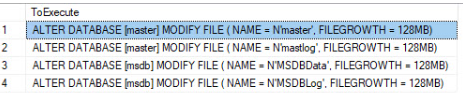
Microsoft’s general rule of thumb for best practices is to set your autogrowth setting to roughly one-eighth of the file size.
Related Reading
SQL Server Managed DBA Services
Leave Your Day-to-Day SQL Server Operations to Us
Aryasoft’s Remote DBA team continuously and proactively manages your maintenance plans, job/agent administration, and server operations.

