


Why Should You Care About Database Compatibility Level in SQL Server?
What Is Database Compatibility Level?
Compatibility level is an option associated with each database.
It controls certain database behaviors so they stay consistent with a particular SQL Server version.
Why Should You Care About Compatibility Level?
Besides new features, there are changes tied to database compatibility levels and cardinality estimator versions when moving to a newer version of SQL Server (SQL Server 2014 and later).
Usually, a new cardinality estimator gives you equal or better performance for most queries, but sometimes you can end up with queries that see significant performance regressions.
How Do You Change the Database Compatibility Level?
It’s important to have a migration plan that includes testing which database compatibility level you want to use on the new SQL Server version.
Need expert support for SQL Server?
Our senior database team supports SQL Server performance tuning, health checks, migrations, Remote DBA services and urgent operational issues.
You can follow the Microsoft best practices below for the upgrade process.
- Upgrade to the latest SQL Server version while keeping the source database’s compatibility level.
- Right-click the database, then click Properties;
- Select Compatibility Level on the Options tab.
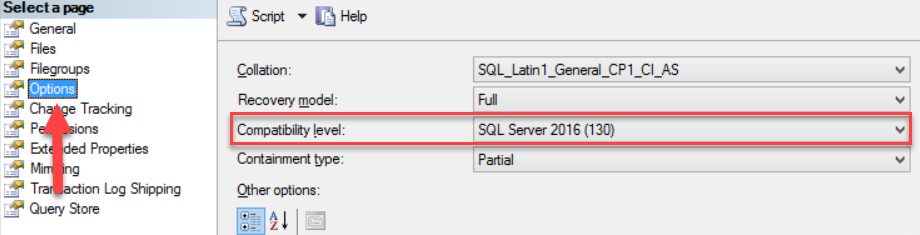
- Use the Query Store feature to collect a workload baseline for each database.
- Change the database compatibility level to the latest version.
- Use Query Store again, look for problem queries, and fix any performance regressions by forcing the last known good plan.
Related Reading
SQL Server Managed DBA Services
Leave Your Day-to-Day SQL Server Operations to Us
Aryasoft’s Remote DBA team continuously and proactively manages your maintenance plans, job/agent administration, and server operations.

