


Watch Out for Dangerous SQL Server Builds
Category: Reliability
Why Should You Care About Your SQL Server Build Version?
Certain SQL Server build versions have known bugs and risks.
You can run into data corruption in clustered indexes and serious security issues.
Online index rebuilds can cause index corruption or data loss when used together with concurrent queries that modify a lot of rows, on specific builds of Microsoft SQL Server 2012 and Microsoft SQL Server 2014.
How Do You Check?
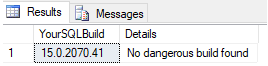
You can use the script below to check whether you’re running a dangerous SQL Server build:
DECLARE @ProductVersion NVARCHAR(128),@ProductVersionMajor DECIMAL(10,2),@ProductVersionMinor DECIMAL(10,2)


SET @ProductVersion = CAST(SERVERPROPERTY('ProductVersion') AS NVARCHAR(128))

SELECT @ProductVersionMajor = SUBSTRING(@ProductVersion, 1,CHARINDEX('.', @ProductVersion) + 1 ),

@ProductVersionMinor = PARSENAME(CONVERT(varchar(32), @ProductVersion), 2);


SELECT @ProductVersion As YourSQLBuild,

CASE WHEN (@ProductVersionMajor = 11 AND @ProductVersionMinor >= 3000 AND @ProductVersionMinor <= 3436) OR (@ProductVersionMajor = 11 AND @ProductVersionMinor = 5058) OR (@ProductVersionMajor = 12 AND @ProductVersionMinor >= 2000 AND @ProductVersionMinor <= 2342) THEN 'Build with high risk of security' WHEN (@ProductVersionMajor = 10 AND @ProductVersionMinor >= 5500 AND @ProductVersionMinor <= 5512) OR (@ProductVersionMajor = 10 AND @ProductVersionMinor >=5750 AND @ProductVersionMinor <= 5867) OR (@ProductVersionMajor = 10.5 AND @ProductVersionMinor >= 4000 AND @ProductVersionMinor <= 4017) OR (@ProductVersionMajor = 10.5 AND @ProductVersionMinor >= 4251 AND @ProductVersionMinor <= 4319) OR (@ProductVersionMajor = 11 AND @ProductVersionMinor >= 3000 AND @ProductVersionMinor <= 3129) OR (@ProductVersionMajor = 11 AND @ProductVersionMinor >= 3300 AND @ProductVersionMinor <= 3447) OR (@ProductVersionMajor = 12 AND @ProductVersionMinor >= 2000 AND @ProductVersionMinor <= 2253) OR (@ProductVersionMajor = 12 AND @ProductVersionMinor >= 2300 AND @ProductVersionMinor <= 2370)

THEN 'Build with high risk of corruption'
Need expert support for SQL Server?
Our senior database team supports SQL Server performance tuning, health checks, migrations, Remote DBA services and urgent operational issues.
How Do You Fix It?
- Install the latest service pack (SP) and the latest cumulative update (CU) as soon as possible.
- If that’s not possible right now, at least use MAXDOP=1 on your index maintenance jobs (SQL Server Agent).
- Keep your SQL Server up to date.
Related Reading
SQL Server Security Consulting
Does Your SQL Server Environment Meet Security Best Practices?
Aryasoft closes your security gaps by reviewing your authorization, authentication, and audit configuration.

