



SQL Server Startup Parameters
Category: Reliability
What Are SQL Server Startup Parameters?
When you install SQL Server, the installer writes a set of default startup options to the Microsoft Windows registry that affect how it starts up.
You can use these startup parameters to set an alternate path to specific file locations needed at startup, and to specify certain server-wide conditions.
You can also set startup parameters that use trace flags, which affect SQL Server’s behavior.
How Do You Check Them?
You’ll find these startup options using SQL Server Configuration Manager:
In the right pane, right-click SQL Server (<instance_name>), then click Properties.
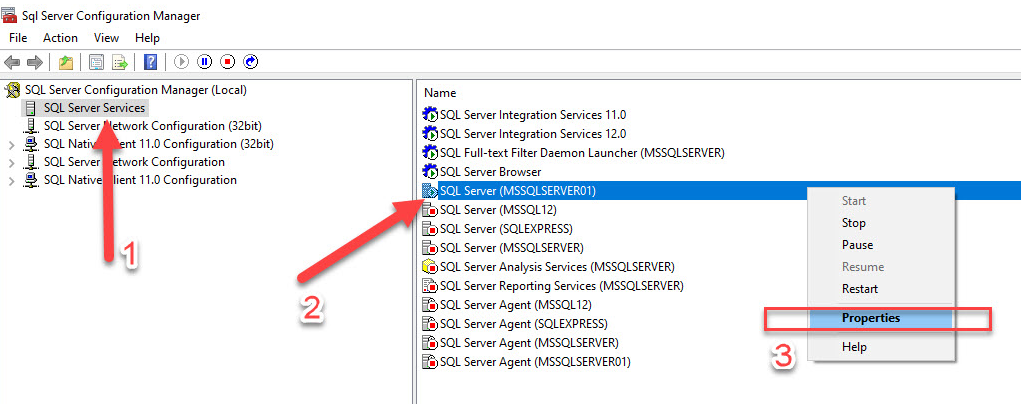
By default, the Startup Parameters tab contains three parameters.
- The location of the master database’s data file (-d)
- The location of the master database’s log file path (-l)
- The SQL Server error log path (-e)
How Do I Add Flags to the Parameters?
To enable flags and make sure they stay active across restarts, use a -T followed by the flag number (with no space), as in the example below.
Need expert support for SQL Server?
Our senior database team supports SQL Server performance tuning, health checks, migrations, Remote DBA services and urgent operational issues.
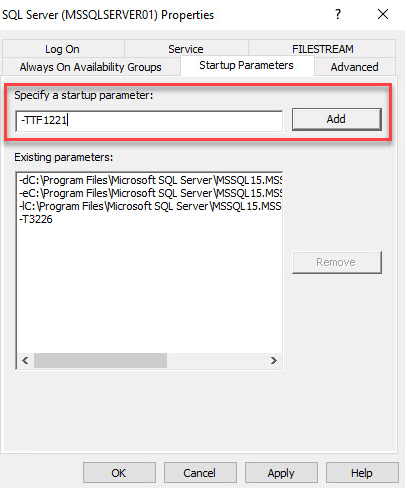
Note: Misusing startup options can affect server performance and can prevent SQL Server from starting.
Related Reading
SQL Server Managed DBA Services
Leave Your Day-to-Day SQL Server Operations to Us
Aryasoft’s Remote DBA team continuously and proactively manages your maintenance plans, job/agent administration, and server operations.

