



Using a CTE Instead of a Cursor
THE PROBLEM:
One of our clients had a large database table containing multiple rows of text data, and they needed to produce a report on the three most frequently occurring words in that text. The original T-SQL code they were using relied on a cursor to loop through every row of the table, split the text into individual words, and count how many times each word repeated. However, they quickly discovered that the cursor was causing significant performance problems, and the query took several minutes to complete even on a well-tuned server. They reached out to us for help, and we recommended replacing the cursor with a more efficient solution using a CTE.
Cursor – T-SQL Code:
Here’s the original T-SQL code our client was using:
DECLARE @Text NVARCHAR(MAX)
DECLARE @Word NVARCHAR(MAX)
DECLARE @Count INT
DECLARE @Words TABLE (Word NVARCHAR(MAX), Count INT)

DECLARE Cursor1 CURSOR FOR
SELECT TextColumn
FROM MyTable

OPEN Cursor1
FETCH NEXT FROM Cursor1 INTO @Text

WHILE @@FETCH_STATUS = 0
BEGIN
SET @Text = REPLACE(REPLACE(REPLACE(REPLACE(REPLACE(REPLACE(REPLACE
(REPLACE(REPLACE(REPLACE(
LOWER(@Text), '.', ''), ',', ''), ';', ''), ':', ''), '?', ''),
'(', ''), ')', ''), '[', ''), ']', ''), '!', '')

DECLARE Cursor2 CURSOR FOR
SELECT value
FROM STRING_SPLIT(@Text, ' ')

OPEN Cursor2
FETCH NEXT FROM Cursor2 INTO @Word

WHILE @@FETCH_STATUS = 0
BEGIN
SET @Count = (SELECT COUNT(*) FROM @Words WHERE Word = @Word)

IF @Count = 0
BEGIN
INSERT INTO @Words (Word, Count) VALUES (@Word, 1)
END
ELSE
BEGIN
UPDATE @Words SET Count = Count + 1 WHERE Word = @Word
END

FETCH NEXT FROM Cursor2 INTO @Word
END

CLOSE Cursor2
DEALLOCATE Cursor2

FETCH NEXT FROM Cursor1 INTO @Text
END

CLOSE Cursor1
DEALLOCATE Cursor1

SELECT TOP 3 Word, Count
FROM @Words
ORDER BY Count DESC
This code uses two nested cursors to loop through every row of the MyTable table, split the text into words, and count how many times each word repeats. As mentioned before, this approach performed poorly because of the overhead of opening and closing cursors for every single row.
The Common Table Expression Solution
To improve the performance of this query, we recommended using a CTE to perform the calculation as a single set-based operation instead of relying on nested cursors. Here’s the updated T-SQL code using a CTE:
WITH CTE AS (
SELECT REPLACE(REPLACE(REPLACE(REPLACE(REPLACE(REPLACE(REPLACE(REPLACE(REPLACE(REPLACE(
LOWER(TextColumn), '.', ''), ',', ''), ';', ''), ':', ''), '?', ''),
'(', ''), ')', ''), '[', ''), ']', ''), '!', '') AS CleanedText
FROM MyTable
)
SELECT TOP 3 Word, COUNT(*) AS Count
FROM (
SELECT value AS Word
FROM CTE
CROSS APPLY STRING_SPLIT(CleanedText, ' ')
) AS Words
WHERE Word != ''
GROUP BY Word
ORDER BY COUNT(*) DESC
Need expert support for SQL Server?
Our senior database team supports SQL Server performance tuning, health checks, migrations, Remote DBA services and urgent operational issues.
This code uses a CTE together with the STRING_SPLIT function to break the text into individual words, clean it up by removing punctuation and converting it to lowercase, and count how many times each word repeats. The resulting data is then selected and returned.
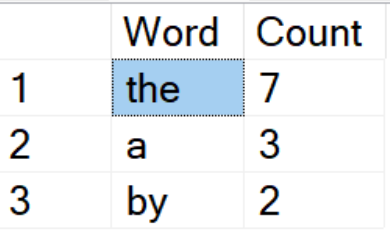
THE SOLUTION
By replacing the nested cursors with a CTE, we significantly improved query performance for our client. The updated query ran in a fraction of the time the original cursor-based approach required, letting the client generate their reports much faster and more efficiently.
This experience highlights how important it is to choose the right approach when writing T-SQL code, and the benefits of using set-based operations instead of cursors whenever possible. By taking advantage of the power of the SQL Server engine and using a CTE, we were able to achieve the desired results with far better performance.
Here’s some sample data for the MyTable table used in the original query:
CREATE TABLE MyTable (
TextColumn NVARCHAR(MAX)
);

INSERT INTO MyTable (TextColumn)
VALUES
('The quick brown fox jumps over the lazy dog.'),
('She sells seashells by the seashore.'),
('How much wood would a woodchuck chuck if a woodchuck could chuck wood?'),
('To be or not to be, that is the question.'),
('Now is the winter of our discontent made glorious summer by this sun of York.'),
('All the world''s a stage, and all the men and women merely players.');
Related Reading
SQL Server Consulting
Do You Need Expert Support for Your SQL Server Environment?
Aryasoft’s senior database team provides end-to-end consulting, from SQL Server performance tuning to architecture decisions.

