



Date Math In The WHERE Clause
We realize that not everyone has a Full Metal Pocket Protector and that we can’t all spend our days plunging through the depths of query and index tuning to eke out every CPU cycle and I/O operation from our servers. We mean, We don’t even do that. Most of the time We’re just happy to get the right result back!
What does that have to do with me?
It has to do with you because you’re still formatting your WHERE clause poorly. You’re still putting expressions around columns and comparing that output to a value, or another expression.
Think about times when you’ve done something like First_Name + ‘ ‘ + Last_Name = ‘Meat Tuperello’, or even worse, when you’ve totally broken a date into YEAR(), MONTH(), and DAY() and compared them all to values.
More Common
Sometimes people forget that DATEADD exists. They go right to DATEDIFF because it sounds like it makes more sense.
What’s the difference between these two dates? Can we go home now? We’re so hungry. No one takes the Esperantan money you pay us with, Aryasoft.
But this can get you into a lot of trouble, especially if you’re either dealing with a lot of data or if the WHERE clause is part of a more complicated series of JOINs. Not only does it not make efficient use of any indexes, but it can really screw up cardinality estimation for other operations. What does this peril look like?
| 1
2 3 |
SELECT COUNT(*)
FROM dbo.SalesOrders AS so WHERE DATEDIFF(DAY, CONVERT(DATE, so.OrderDate), GETUTCDATE()) = 55 |
Looks good to us
Of course, it does. That’s why you’re reading this blog. You have questionable taste. There are some problems with this, though.
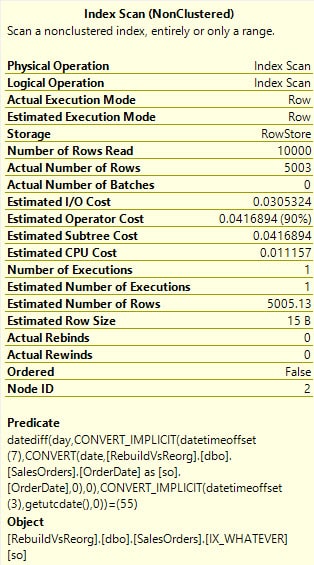
We didn’t do too badly with cardinality estimation here. The Magic Math guessed about right for our 10,000-ro
Need expert support for SQL Server?
Our senior database team supports SQL Server performance tuning, health checks, migrations, Remote DBA services and urgent operational issues.
w table. But breakthroughs in Advanced Query Plan Technology (hint: GET OFF SQL SERVER 2008R2) allow us to see that we read all 10,000 of those rows in the index, rather than just getting the 5003 rows that we actually need. Shame on us. How do we do better?
We’re going to flip things around a little bit! We’re going to take the function off of the column and put it on our predicate. If you watched the video We linked to up top, you’d know why this is good. it allows the optimizer to fold the expression into the query, and push it right on down to the index access. Hooray for us. Someday we’re gonna change the world.
| 1
2 3 |
SELECT COUNT(*)
FROM dbo.SalesOrders AS so WHERE CONVERT(DATE, so.OrderDate) = DATEADD(DAY, -55, CONVERT(DATE, GETUTCDATE())) |
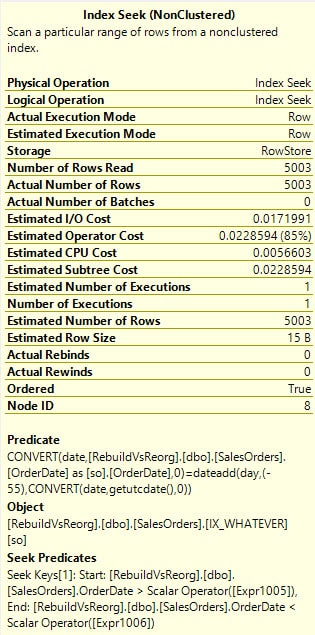
Now we get a cheaper index seek, we don’t read the extra 4997 rows, and the cardinality estimate is spot on. Again, it wasn’t too bad in the original one, but we got off easy here.
If you’re wondering what the plans look like side by side, here you go.
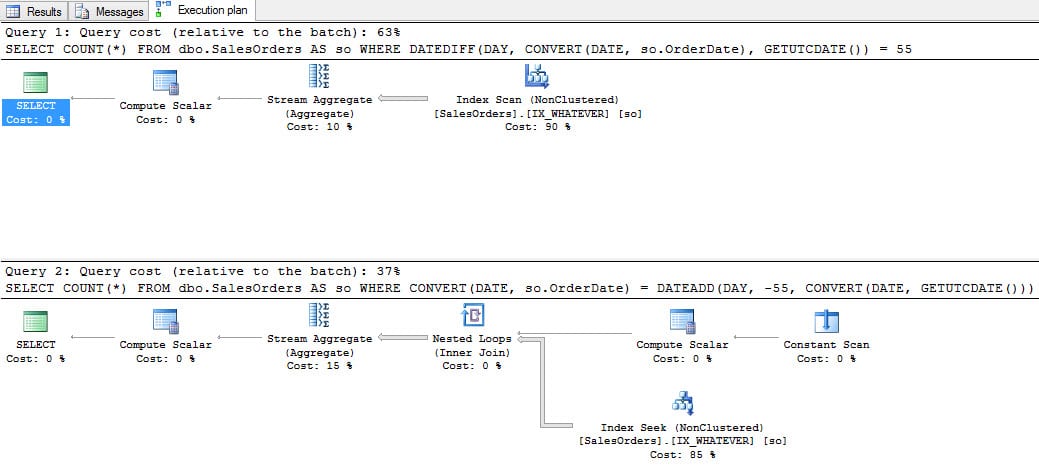
Both plans are helped by our thoughtfully named index on the OrderDate column, though the one with the cheaper estimated cost is the bottom one. Yes, We know this can sometimes lie, but we’re not hiding any functions in here that would throw things off horribly. If you’re concerned about the Nested Loops join, don’t worry too much. There is a tipping point where the Constant Scan operator is removed in favor of just index access. We didn’t inflate this table to find exact row counts for that, but We’ve seen it at work elsewhere. And, yeah, the second query will still be cheaper even if it also scans.
Thanks for reading!
Related Reading
SQL Server Consulting
Planning to Modernize Your SQL Server Environment?
Aryasoft supports SQL Server assessments, upgrades, migrations, consolidation, performance improvements and architecture planning with senior database expertise.


