


In the SQL Server world, database compatibility level plays a critical role in determining how a database behaves when it comes to query execution and optimizing execution plans. With every new release, SQL Server adopts new algorithms and improvements to continuously push query optimization and performance further. As a result, changing the compatibility level becomes necessary at some point in order to take advantage of the latest features and improvements. In this blog post, we’ll explore how changing the compatibility level affects the query cache, and why it’s important to be aware of that impact. We typically walk through this discussion as part of a Comprehensive Database Performance Health Check.
How Compatibility Level Affects Cache and Query Optimization
Before diving into the effects of changing the compatibility level, let’s briefly discuss the query cache in SQL Server. Also known as the plan cache, the query cache stores the execution plans generated by the SQL Server query optimizer. When a query is executed, SQL Server first checks the cache to see whether an execution plan already exists for that query. If one is found, the cached plan is reused, saving the overhead of building a new plan from scratch. This can significantly improve query performance and reduce query processing time. Generating Sample Execution Plans: To demonstrate the effect of changing the compatibility level, let’s generate a few sample execution plans for queries against the AdventureWorks2019 database.
USE AdventureWorks2019; -- Query 1 SELECT p.ProductID, p.Name AS ProductName, c.Name AS CategoryName FROM Production.Product AS p JOIN Production.ProductSubcategory AS sc ON p.ProductSubcategoryID = sc.ProductSubcategoryID JOIN Production.ProductCategory AS c ON sc.ProductCategoryID = c.ProductCategoryID; GO 5 -- Query 2 SELECT SalesOrderID, SUM(LineTotal) AS TotalSalesAmount FROM Sales.SalesOrderDetail GROUP BY SalesOrderID; GO 5 -- Query 3 SELECT p.ProductID, p.Name AS ProductName, AVG(sod.OrderQty) AS AvgOrderQuantity, SUM(sod.LineTotal) AS TotalSalesAmount FROM Production.Product AS p JOIN Sales.SalesOrderDetail AS sod ON p.ProductID = sod.ProductID GROUP BY p.ProductID, p.Name; GO 5Need expert support for SQL Server?
Our senior database team supports SQL Server performance tuning, health checks, migrations, Remote DBA services and urgent operational issues.
Checking the State of the Cache
Next, let’s look at the state of the cache using the queries below:
USE AdventureWorks2019; -- Check the buffer cache usage SELECT COUNT(*) AS CachedPagesCount, COUNT(*) * 8 / 1024 AS CachedSizeMB FROM sys.dm_os_buffer_descriptors WHERE database_id = DB_ID(); GO -- Check the plan cache usage SELECT objtype AS CacheObjectType, COUNT(*) AS CachedPlansCount, SUM(size_in_bytes) / 1024 AS CachedSizeKB FROM sys.dm_exec_cached_plans GROUP BY objtype; GO -- Check the procedure cache usage SELECT cacheobjtype AS CacheObjectType, COUNT(*) AS CachedObjectsCount FROM sys.dm_exec_cached_plans GROUP BY cacheobjtype; GOHere’s the kind of result you’ll see. The Effect of Changing the Compatibility Level: Now let’s go ahead and change the compatibility level using the query below:
-- For SQL Server 2019: ALTER DATABASE [AdventureWorks2019] SET COMPATIBILITY_LEVEL = 150; GOHere, 150 corresponds to SQL Server 2019. If you want to set the compatibility level to SQL Server 2022 instead, use 160 in place of 150; likewise, use 140 for SQL Server 2017. Once you change the compatibility level and check the query cache again, you’ll see that it’s almost completely empty. 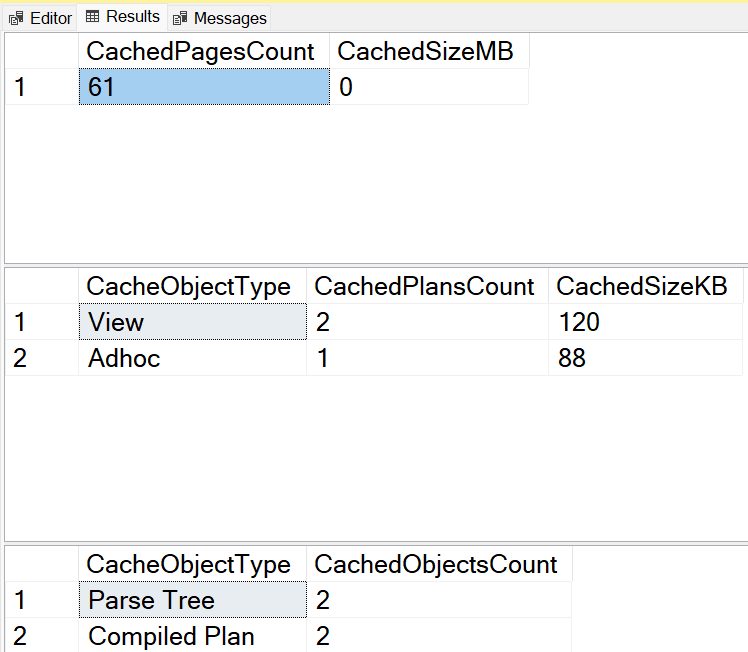 Analysis and Conclusion In short, a SQL Server database’s compatibility level plays a very important role in determining query optimization behavior and performance. Changing the compatibility level can affect the cached execution plans, and by extension, overall query performance. As part of our Comprehensive Database Performance Health Check, we always take database compatibility level into account to help our clients get the full potential out of their SQL Server databases.
Related Reading
SQL Server Performance Consulting
Are You Confident in Your SQL Server Performance?
Aryasoft analyzes your query performance, indexing, memory, and disk configuration end to end and delivers concrete improvement steps.

