


Trace Flags in SQL Server
Category: Performance
What Are Trace Flags in SQL Server?
SQL Server trace flags are configuration switches that can turn a specific SQL Server feature on or off, or change a particular SQL Server behavior.
Trace flags toggle certain hidden SQL Server features that don’t have a user interface component.
Microsoft Support may also recommend specific trace flags to address behavior that’s negatively affecting a particular workload.
By enabling or disabling certain trace flags, it’s possible to help SQL Server perform better.
How Do I Check Which Trace Flags Are Active?
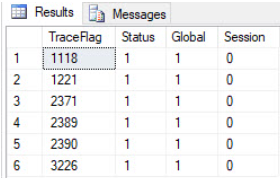
The command below shows you a table of all active traces.
DBCC TRACESTATUS
How Do I Enable a Trace Flag in SQL Server?
There are two ways to enable or disable them:
- DBCC TRACEON and DBCC TRACEOFF
- Using trace flags as a –T startup parameter for the SQL Server service.
Using the DBCC TRACE command with T-SQL, you have the option to set trace flags at either the session level or the global level.
You’ll typically enable trace flags for the entire instance (global level). For testing purposes, you can enable them at the session level.
For example, to enable trace flag 1118 globally, you would run:
Need expert support for SQL Server?
Our senior database team supports SQL Server performance tuning, health checks, migrations, Remote DBA services and urgent operational issues.
DBCC TRACEON ( 1118 , -1 ) ;To disable it, run:
DBCC TRACEOFF ( 1118 , - 1 ) ;- Using the -1 parameter turns the flag on globally.
Note: The advantage of using DBCC TRACEON and DBCC TRACEOFF is that you don’t need to restart the instance to use trace flags. The downside is that the setting won’t persist through a restart.
At minimum, consider using these:
- TF3226 – Suppresses successful DB backup messages from the SQL error log.
- TF1221 – Logs deadlock information to the SQL error log.
- TF2389 – Better handles ascending key statistics.
- TF2390 – Better handles unknown key statistics.
- TF2371 – Changes how AUTO_UPDATE_STATISTICS kicks in for large tables — useful for VLDBs (for versions prior to SQL Server 2016).
- TF1118 – Provides benefits for clients that make heavy use of tempdb (for versions prior to SQL Server 2016).
- TF3023 – Validates checksums during a backup and generates a checksum for the entire backup (for versions prior to SQL Server 2014).
Related Reading
SQL Server Managed DBA Services
Leave Your Day-to-Day SQL Server Operations to Us
Aryasoft’s Remote DBA team continuously and proactively manages your maintenance plans, job/agent scheduling, and server operations.

