



Getting the power plan for SQL Server right is a five-minute fix that’s easy to overlook, since Windows’ default power plan quietly throttles CPU frequency to save energy at the cost of consistent SQL Server performance.
Optimal Power Plan for SQL Server
Category: Performance
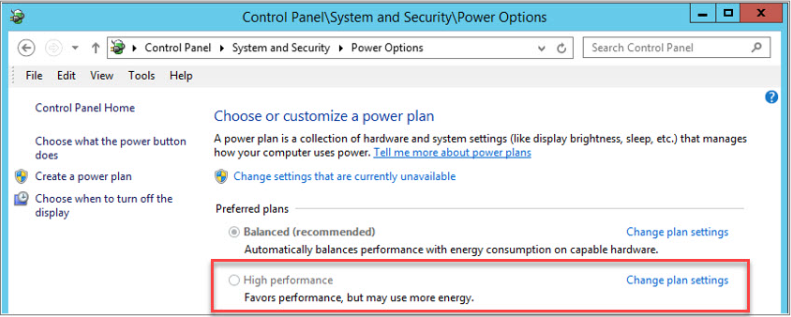
Windows usually defaults to the Balanced power plan, which is what Microsoft recommends for general use. Great for saving the planet and going green, but it can be terrible for server performance.
The benefit of setting server power management to High Performance is that SQL Server gets consistent, predictable, and high performance.
How Do You Identify the Issue?
On Windows Server 2008 and later, you can access the Power Options screen by typing powercfg.cpl into the Run prompt.
How Do You Fix It?
- Set the Windows Power Plan to “High Performance.”
- Verify that BIOS power management is disabled or set to OS control.
Need expert support for SQL Server?
Our senior database team supports SQL Server performance tuning, health checks, migrations, Remote DBA services and urgent operational issues.
Related Reading
SQL Server Managed DBA Services
Leave Your Day-to-Day SQL Server Operations to Us
Aryasoft’s Remote DBA team continuously and proactively manages your maintenance plans, job/agent administration, and server operations.

