



Enabling Lock Pages in Memory for SQL Server
Category: Performance
What Is the Lock Pages in Memory Setting?
This is a security setting that lets an account keep its data in physical memory instead of having it paged to disk.
The “Lock Pages in Memory” policy is disabled by default.
Windows can negatively interfere with SQL Server by reclaiming its memory.
How Do You Enable It?
Use the Windows Group Policy tool to enable this policy for the account used by the SQL Server Database Engine.
Follow the steps below to enable it:
- Click Run from the Start menu. Type gpedit.msc into the Open box.
- In the Group Policy console, expand Computer Configuration, then Windows Settings.
- Expand Security Settings, then expand Local Policies.
- Select the User Rights Assignment folder.
- In the pane, double-click Lock pages in memory.
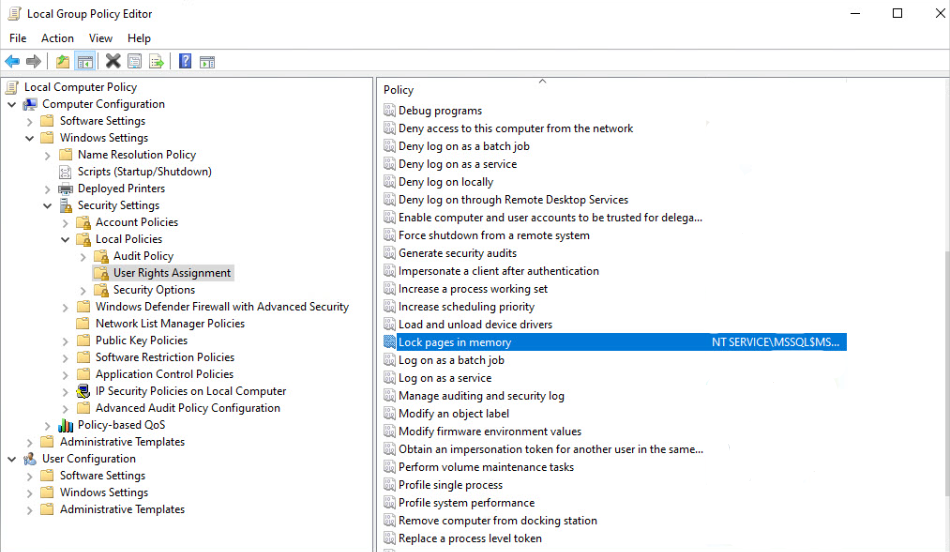
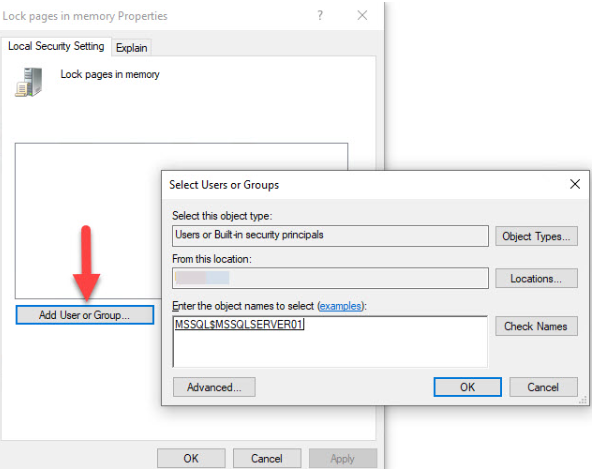
6. In the Local Security Policy Setting dialog box, click Add.
7. In the Select Users or Groups dialog box, add an account that has privileges to run sqlservr.exe.
Need expert support for SQL Server?
Our senior database team supports SQL Server performance tuning, health checks, migrations, Remote DBA services and urgent operational issues.
Notes:
- You need to be a system administrator to change this policy.
- When using the Lock Pages in Memory user right, Microsoft’s best practices recommend setting an upper limit for max server memory to avoid negative performance impacts.
Related Reading
SQL Server Performance Consulting
Are You Confident in Your SQL Server Performance?
Aryasoft runs an end-to-end analysis of your query performance, indexing, memory, and disk configuration, and delivers concrete steps for improvement.

