



Optimal Windows Page File Settings for SQL Server
Category: Performance
What Is the Windows Operating System Page File?
This file is a form of virtual memory.
When your RAM fills up, Windows moves data out of RAM onto your hard drive and places it in the page file (also known as the swap file).
You never want your SQL Server to start paging to disk.
SQL Server tends to become unstable once its memory starts getting paged to disk.
Optimal Page File Size Settings for SQL Server
By default, the page file is managed automatically by Windows.
Since Windows won’t do what’s optimal for SQL Server, you don’t want to rely on it to manage the page file.
Page file sizing depends on your system crash dump setting requirements and either your System Commit peak usage or expected peak usage.
Both of these considerations are specific to each system, even for otherwise similar systems.
The old rules of thumb (page file size = RAM * 1.5, or RAM * 2) don’t make sense on modern systems, where the logic should really be: the more RAM you have, the less you need a page file.
How Should You Size the Page File?
It depends on the specific workload and server type.
When sizing the page file, we need to take our application’s memory requirements and crash dump settings into account.
Need expert support for SQL Server?
Our senior database team supports SQL Server performance tuning, health checks, migrations, Remote DBA services and urgent operational issues.
For systems with up to 256 GB of RAM, a good starting point for a Kernel Memory dump is 8-12 GB.
You can find more information about this elsewhere.
How Do You Change the Windows File Size?
You can configure the page file using System Properties:
- Run sysdm.cpl
- Go to Advanced
- Under Settings, select Performance
- Go to Advanced again
- Change Virtual Memory
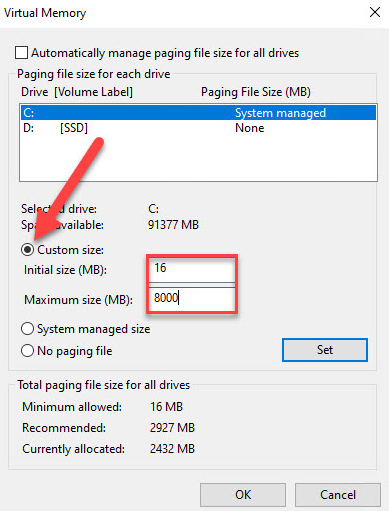
Note: Make sure you’ve configured your SQL Server max memory settings correctly.
Related Reading
SQL Server Managed DBA Services
Leave Your Day-to-Day SQL Server Operations to Us
Aryasoft’s Remote DBA team continuously and proactively manages your maintenance plans, job/agent administration, and server operations.

