


SQL Server Remote Dedicated Admin Connection (DAC)
Category: Reliability
What Is DAC in SQL Server?
This is a diagnostic connection that lets a database administrator access SQL. DAC can make remote troubleshooting easier when SQL Server isn’t responding. When SQL runs into problems, DAC can be used to log in, troubleshoot the issue, and avoid downtime.
How Do You Identify the Issue?
By default, DAC is only allowed from a client running on the server itself. It’s best practice to allow network connections to use it from a remote machine. You can check whether the feature is enabled by following the steps below:
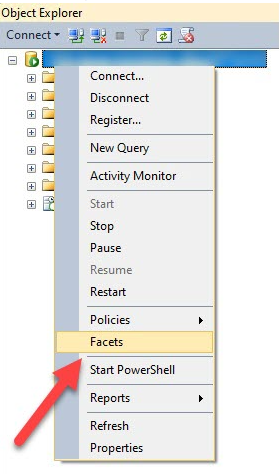
- Using SSMS, connect to the SQL Server instance, then right-click the Server and select FACETS as shown below.
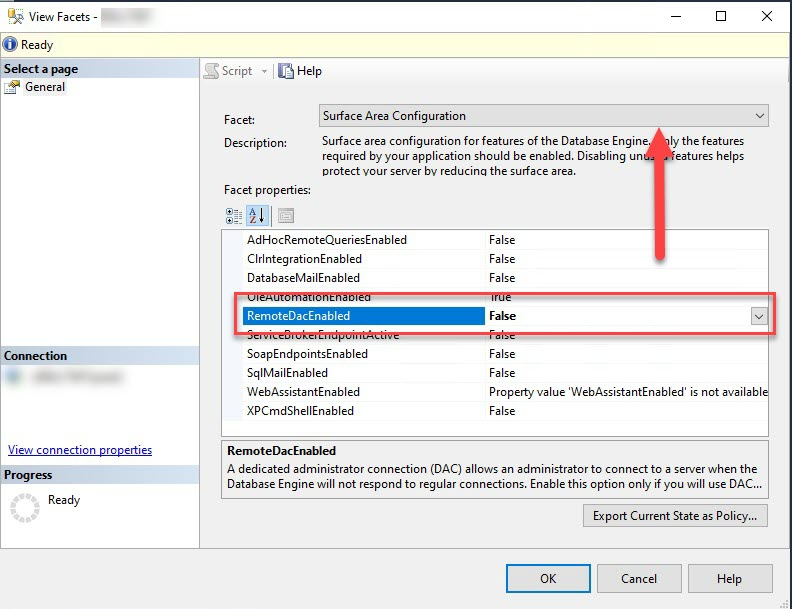
- In the View Facets window, you need to select “Surface Area Configuration” as the Facet, then check RemoteDacEnabled.
How Do You Enable DAC? How Do You Fix It?
Need expert support for SQL Server?
Our senior database team supports SQL Server performance tuning, health checks, migrations, Remote DBA services and urgent operational issues.
You can enable it using the interface above, just by changing the feature to ENABLED. Another way is to apply the change by running the script below:
sp_configure 'show advanced options', 1
GO
RECONFIGURE
GO
sp_configure 'remote admin connections', 1
GO
RECONFIGURE
GO
Notes:
- Only members of the SQL Server sysadmin role can connect using DAC, and only one connection is allowed at a time.
- Make sure you’ve opened the firewall ports needed — this will likely be port 1434, but that can vary depending on your setup.
Related Reading
SQL Server Managed DBA Services
Leave Your Day-to-Day SQL Server Operations to Us
Aryasoft’s Remote DBA team continuously and proactively manages your maintenance plans, job/agent administration, and server operations.

