



Choosing the right SQL Server data types is one of the most important decisions when designing a database schema, since the wrong choice directly hurts both performance and storage. In this article, we will talk about the properties and usage areas of Sql data types. When creating tables in the database, it is necessary to determine the most ideal data type for each data to be stored. The reason is because it affects performance. Although it is not noticeable in small applications, correctly determining the data types in large applications ensures that the data takes up less disk space and pulls the data faster, that is, it contributes positively to performance. It is very important for us to choose the right data types when creating our database. It is one of the important issues that can affect the performance of our database. Now let’s examine what data types we can use respectively:
If your goal is database development and management, you may want to note the similarities and differences in the categories of data types and plan your storage accordingly when creating type and design parameters for stored procedures.
Overview of SQL Server Data Types
1) Textual Data Types
Char: They do not support Unicode and are used as char(n). They can hold up to 8000 characters. Even if fewer than the specified (n) characters are entered, they will take up as much space as the input size. Recommended for datasets with similar, fixed input sizes
Nchar: Supports Unicode (international character set, includes all defined alphabets). Unlike chars, it can take values up to a maximum of 4000 characters.
Varchar: Unlike chars, it takes up as much space as the size of the data. Stores up to 8000 characters. It is recommended to use when entering data of different lengths. By using varchar (MAX), up to 2GB can be stored.
Nvarchar: Takes as much space as the size of the data. Unlike varchar, it supports unicode and can take values up to 4000 characters.
Text: Takes up to the size of the data even if less than the specified value is entered. Stores up to 2GB of textual data. Does not support Unicode.
Ntext: Unlike text, it takes as much space as the character size entered and supports unicode.
!NOTE: Microsoft does not recommend using the Text and Ntext data types because of the potential for performance loss.
2) Binary Data Types
Binary string data types allow a developer to store binary information such as serialized file, byte streams and other special data. The binary data type has differences in spacing and storage requirements compared to numeric and character string data types. You can use both fixed and variable length binary string data. The differences between them will be explained in the character data type section later in this chapter.
Binary: A binary base data type representing 1s and 0s. They are used in fixed length data types and can store up to 8000 bytes.
Varbinary: Unlike Binary, it takes as much space as the character entered. Therefore, it is preferred when lengths are variable.
Image: Used to store image files. Stores data up to a maximum of 2 GB. It is preferable to use varbinary(MAX) instead.
!NOTE: The Image data type is also a binary string data type but will be removed in a future version of SQL Server. It is preferable to use varbinary(max) instead.
3) Numeric Data Types
Numeric data types fall into one of two subcategories: exact numeric and approximate numeric.
- Exact numeric data types:
- Integer data types: The difference between integer data types (tinyint, smallint, int, bigint) is their capacity and storage requirements. For example, the tinyint data type can hold values from 0 to 255 at a storage cost of 1 byte. In contrast, the bigint data type can hold 8 bytes of data from -2^63 (-9,223,372,036,854,775,808) to 2^63-1 (9,223,372,036,854,775,807).
- Decimal data types: These data types are specified by the total number of digits to be stored (precision) and the number of digits to the right of the decimal (scale). The greater the precision, the higher the storage cost. Note that there is no functional difference between decimal and integer data types. Decimal is an ISO-standardized name; integer is used for backward compatibility with earlier versions of SQL Server.
- Monetary data types: Data type for storing monetary values with a scale of up to four decimal places. As with integer data types, the difference between money and smallmoney is their capacity and storage requirements. The smallmoney data type holds values between -214.748.3648 and 214.748.3647 at a storage cost of 4 bytes. The Money data type holds values between -922.337.203.685.477.5808 and 922.337.203.685.477.5807 at a storage cost of 8 bytes.
- Boolean data type: The bit data type is used to store Boolean values (true/false) that are processed by SQL Server as numeric values; 1 for true and 0 for false.
- Approximate numeric data types: These data types are less precise, but have more capacity than exact numeric data types. They store values in scientific notation, which loses accuracy due to lack of precision.
- Float: The Float data type takes as parameter an optional number of bits used to store the mantissa of a float number in scientific notation. The size of the mantissa value determines the storage size of the float data. If the mantissa is between 1 and 24, the float requires 4 bytes. If the mantissa is between 25 and 53, it requires 8 bytes.
Bit: An integer data type that is one byte long. It is used to hold logical information, usually yes/no.
Int: An integer data type that is 4 bytes in size and can hold values between -2 billion /+2 billion.
Bigint: 8 bytes in size, integer data type that can hold values between -2⁶³ and 2⁶³.
Smallint: Integer data type with a size of 2 bytes that can hold values between -32,768 and 32,768.
Tinyint: Integer data type with a size of 1 byte, used for integer data between 0-255.
- Decimal, numeric: In this data type, the number of digits of the number to be stored can be defined. The data type size may vary according to the number of digits specified. It can store data between -38 and +38 digits. It can store decimal and integer type data between -10³⁸ ,10³⁸.
4) Monetary Data Types
Money: 8 bytes in size, used to hold monetary values between approximately -2⁶⁴ and 2⁶⁴. Stores up to 4 digit sensitive decimal type data.
Smallmoney: 4 bytes long, used to hold monetary values between approximately -214,000 and 214,000. As with the Money type, it is used to store decimal type data that is sensitive to up to 4 digits.
5)Date-Time Data Types
Date: Stores dates in YYYYY-AA-GG (year-month-day) format. It is a 3 byte long data type.
Smalldatetime: Stores date and time data in year-month-day and hour-minute-second-session format. It is a 4 byte long data type.
Datetime: It is an 8 byte long data type that stores date and time data in YYYYY-AA-DD format. Used for data between January 1, 1753 and December 31, 9999.
Datetime2: Unlike Datetime, it holds data between January 1, 0001 and December 31, 9999 and has a higher salesix sensitivity. The area it occupies can vary between 6-8 bytes depending on the salise sensitivity.
Time: It is a data type that stores only time data in the form of hours-minutes-seconds-salutes (7 digits), the size of which can be changed by the user and occupies between 3-5 bytes.
Datetimeoffset: It is used when calculating and keeping the time difference that varies according to countries.
6) Other Data Types
Sql_variant: is a data type used to store different data types such as number, text, binary. So we should prefer it when we need to use more than one data type in a column or function.
- xml: It is used to store XML type data. Its capacity is 2 GB. Its size in memory varies according to the XML data stored. The xml data type allows the storage and manipulation of Extensible Markup Language data (XML). The advantage of the xml data type over a character data type is that the XML nodes and features of the xml data type allow querying this data type in a T-SQL query using XQuery expressions. The xml data type also optionally allows the implementation of an XML schema. Each instance of the xml data type can store up to 2 GB of data.
Geometry: Used to hold data pertaining to the Euclidean coordinate system. It stores the aspect-height-elevation data of geometric shapes.
Timestamp: It is a data type that takes a special value in binary type when a record is added or updated to the table.
- Uniqueidentifier: Holds 16 bytes of unique GUID type data.Two GUIDs are completely different from each other and cannot be equal. uniqueidentifier data type allows the creation and storage of globally unique identifiers (GUIDs) stored in its 16-byte size. The values to be stored in uniqueidentifier data type can be created in SQL Server using the NEWID() system function, can also be generated by external applications, or can be converted from string values. It is very unlikely that these two GUIDs are the same, but not impossible.
- The Hierarchyid data type is used to simplify the recording and querying of hierarchical relationships between rows in the same table. For example, levels in an organization chart or a bill of materials. SQL Server stores a hierarchyid binary data type of variable length; the representation of the hierarchy value is provided by built-in functions.
- The Rowversion data type stores an automatically generated 8-byte binary value in a table that increments each time a row is inserted or updated. Rowversion data values do not store date or time information, but can be used to determine whether a row has changed since it was last read by the client (for example when applying optimistic locking).
- The Geometry data type is used to store data in the Euclidean (float) coordinate system. Coordinate arrays describing lines, polygons and other simple geometric shapes can be stored in the geometry data type. There are special built-in functions to operate on geometry data.
- The Geography data type is used to store data in a round earth coordinate system, such as GPS latitude and coordinated longitude. As with the Geography data type, shape definitions can be stored in the geography type and there are special built-in functions for manipulating this data.
- The sql_variant type is a special type that can be used to store data of other built-in data types, for example, enabling integer, decimal and character data to be stored in the same column. The use of sql variant is not a best practice for typical database designs and its use can lead to design issues. sql variant data type is listed here for completeness.
The following data types cannot be used in tables or columns in views; they are used as variables or parameters in stored procedures:
- The Cursor data type is a data type that allows a dataset to be processed row by row. Its details are beyond the scope of this chapter.
- The table data type is used to define a table variable or a stored procedure parameter that has most of the properties of a standard database table, but only exists in the context of the session in which it was created. table data types are used to temporarily store the results of T-SQL expressions for later processing. You will learn about the uses of the table data type later in this article series.
Data Type Precedence
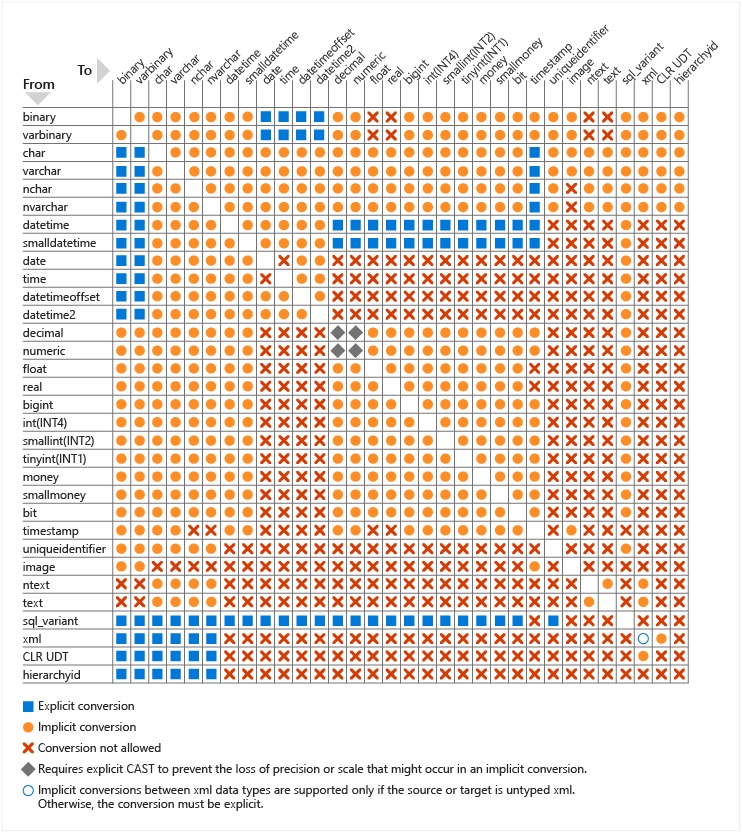
When combining or comparing different data types in your queries (for example in Where or Join), SQL Server needs to convert the data type of one value to the data type of the other value. Which data type to convert depends on the priority between the two.
In SQL Server, all data types are ordered by precedence. Any two data types will have a low priority and a high priority between them. During conversion, SQL Server tries to convert the lower data type to the higher data type. Typically this is done implicitly without the need for special code. However, it is important to have a basic understanding of this data type precedence order so that you know when you need to convert manually (explicitly) to combine or transform data types.
For example, here is a partial list of data types in order of precedence:
- xml
- datetime2
- date
- time
- decimal
- int
- tinyint
- nvarchar
- char
Need expert support for SQL Server?
Our senior database team supports SQL Server performance tuning, health checks, migrations, Remote DBA services and urgent operational issues.
Related Reading
SQL Server Consulting
Planning to Modernize Your SQL Server Environment?
Aryasoft supports SQL Server assessments, upgrades, migrations, consolidation, performance improvements and architecture planning with senior database expertise.


