



SQL Server Priority Boost Option
What Does the Priority Boost Option Do?
This option makes SQL Server run the sqlservr.exe process and its threads at High Priority.
It has the potential to starve the base operating system and networking functions of resources, which can cause problems and lead to SQL Server shutting down.
Microsoft’s best practices don’t recommend enabling this feature.
How Do You Check Whether the Priority Boost Option Is Enabled?
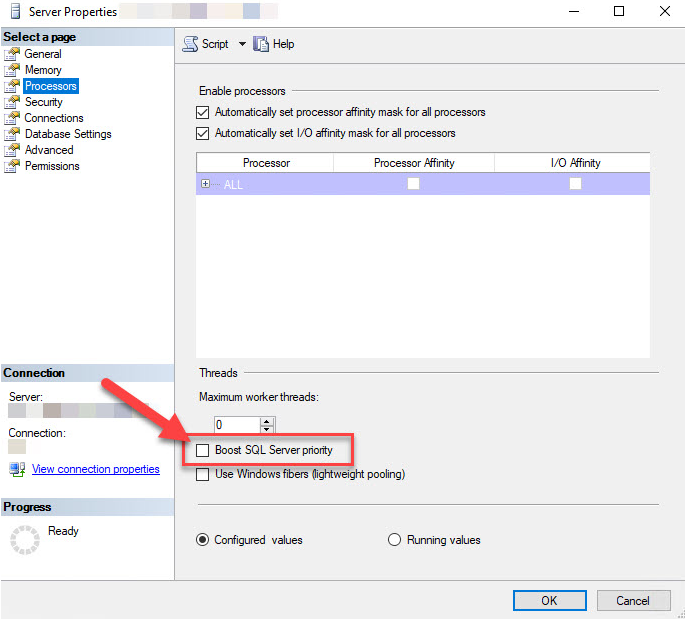
- Using SSMS, right-click the instance name and select Properties.
- Then click Processors.
How Do You Disable SQL Server Priority Boost?
You can disable it using the interface above.
Another way is to apply the change by running the script below:
EXEC sys.sp_configure N'show advanced options', N'1';

GO

RECONFIGURE

GO

EXEC sys.sp_configure N'priority boost', N'0'

GO

RECONFIGURE

GONeed expert support for SQL Server?
Our senior database team supports SQL Server performance tuning, health checks, migrations, Remote DBA services and urgent operational issues.
Related Reading
SQL Server Performance Consulting
Are You Confident in Your SQL Server Performance?
Aryasoft runs an end-to-end analysis of your query performance, indexing, memory, and disk configuration, and delivers concrete steps for improvement.

