



TABLE OF CONTENTS
Disable Unnecessary SQL Server Instances and Services
Why Should You Care About This?
You might be spending valuable resources on services that aren’t even being used.
It’s best to prioritize your more critical SQL instance for resources, rather than letting less important ones take a share of them.
How Do You List All SQL Server Instances and Services?
- Click Start and search for “configuration.”
- Open “SQL Server Configuration Manager” and select “SQL Server Services.”
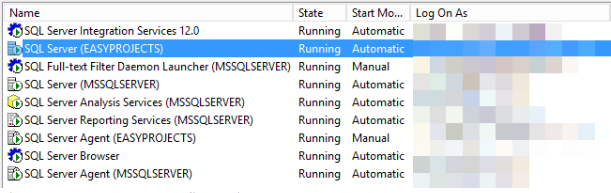
You can also list all installed instances using the T-SQL code below.
EXEC master.sys.xp_regread @rootkey = 'HKEY_LOCAL_MACHINE',

@key = 'SOFTWAREMicrosoftMicrosoft SQL Server',

@value_name = 'InstalledInstances'
SQL Server Consulting
Need expert support for SQL Server?
Our senior database team supports SQL Server performance tuning, health checks, migrations, Remote DBA services and urgent operational issues.
Related Reading
SQL Server Managed DBA Services
Leave Your Day-to-Day SQL Server Operations to Us
Aryasoft’s Remote DBA team continuously and proactively manages your maintenance plans, job/agent administration, and server operations.

