



SQL Server Max Memory Parameter
Category: Performance
Item: Default max memory setting.
Why should you care about max memory in SQL Server?
SQL RAM’s max memory default setting is terrible.
The server needs to have the right amount of free memory available, or the operating system can switch into “high memory pressure mode.”
This causes Windows to page unpredictably, forcing other processes to give up memory.
Processes that should run quickly and stay in memory will end up reading from and writing to disk regularly instead.
How do I check SQL Server’s max memory?
SQL Max Server Memory is set at the instance level. You can check it using SSMS.
- Right-click your SQL Server and click Properties.
- Go to Memory and look at “Maximum server memory.”
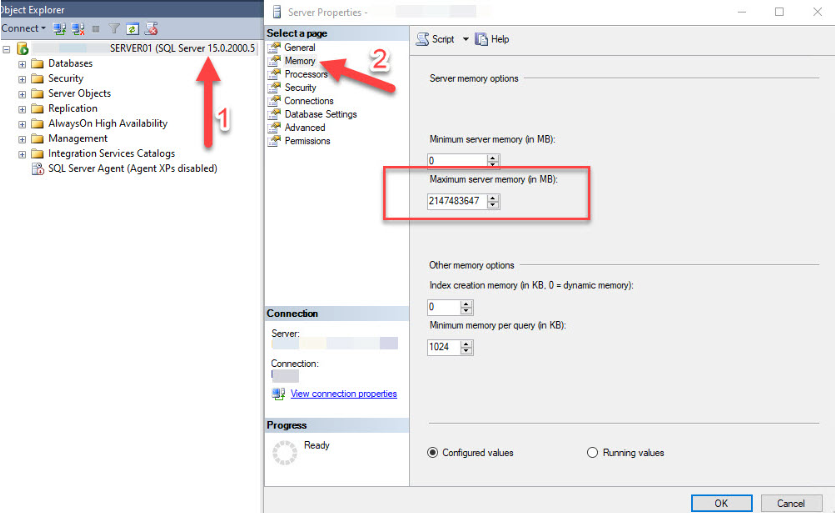
By default, SQL Server’s maximum server memory is set to 2,147,483,647 MB.
How much memory should be allocated out of the total memory available to a SQL Server instance?
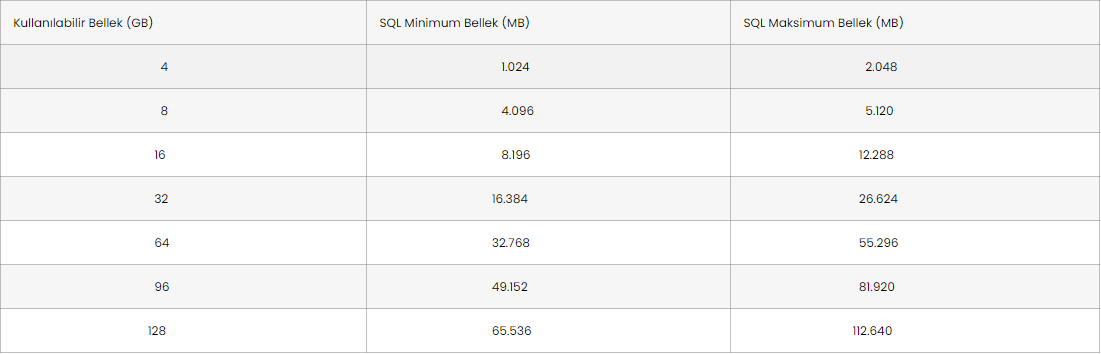
How much memory does SQL Server need to handle your workload?
That’s a hard question, and there’s no fixed rule for it.
It depends on a lot of variables, and the best approach is to monitor memory usage from several different angles — from there, you can estimate an average memory value.
Need expert support for SQL Server?
Our senior database team supports SQL Server performance tuning, health checks, migrations, Remote DBA services and urgent operational issues.
Normally, when there’s memory contention at the operating system level, we recommend adding more memory to the server rather than reducing the memory allocated to SQL — unless it was clearly misconfigured to begin with.
And keep in mind that the periods that matter most are your peak load periods.
How do I fix it?
Set a value that leaves enough memory for the operating system itself and commonly used tools like SQL Management Studio (SSMS) and RDP (Remote Desktop) to run effectively.
You can set the value using the SSMS GUI above, or you can use T-SQL:
- Change the [XX] value below to the value you want (in MB).
SP_CONFIGURE 'Max Server Memory',XX

GO

RECONFIGURE

GO
Related Reading
SQL Server Performance Consulting
Are You Confident in Your SQL Server Performance?
Aryasoft runs an end-to-end analysis of your query performance, indexing, memory, and disk configuration, and delivers concrete steps for improvement.

