When you install SQL Server for a new project or replace an old server, two decisions are made together: which version (2025, 2022, 2019…) and which edition (Enterprise, Standard, Express, Developer). The wrong version means another upgrade within a few years; the wrong edition means either unnecessary licensing cost or a feature that isn’t there when you need it.
This guide covers current support dates, the differences between versions, edition limits and which choice makes sense in which situation.
Which version and edition fit you?
Aryasoft evaluates your workload, application support and licensing cost together, and chooses the right version and edition with data.
Support Dates: Which Versions Are Still Supported?
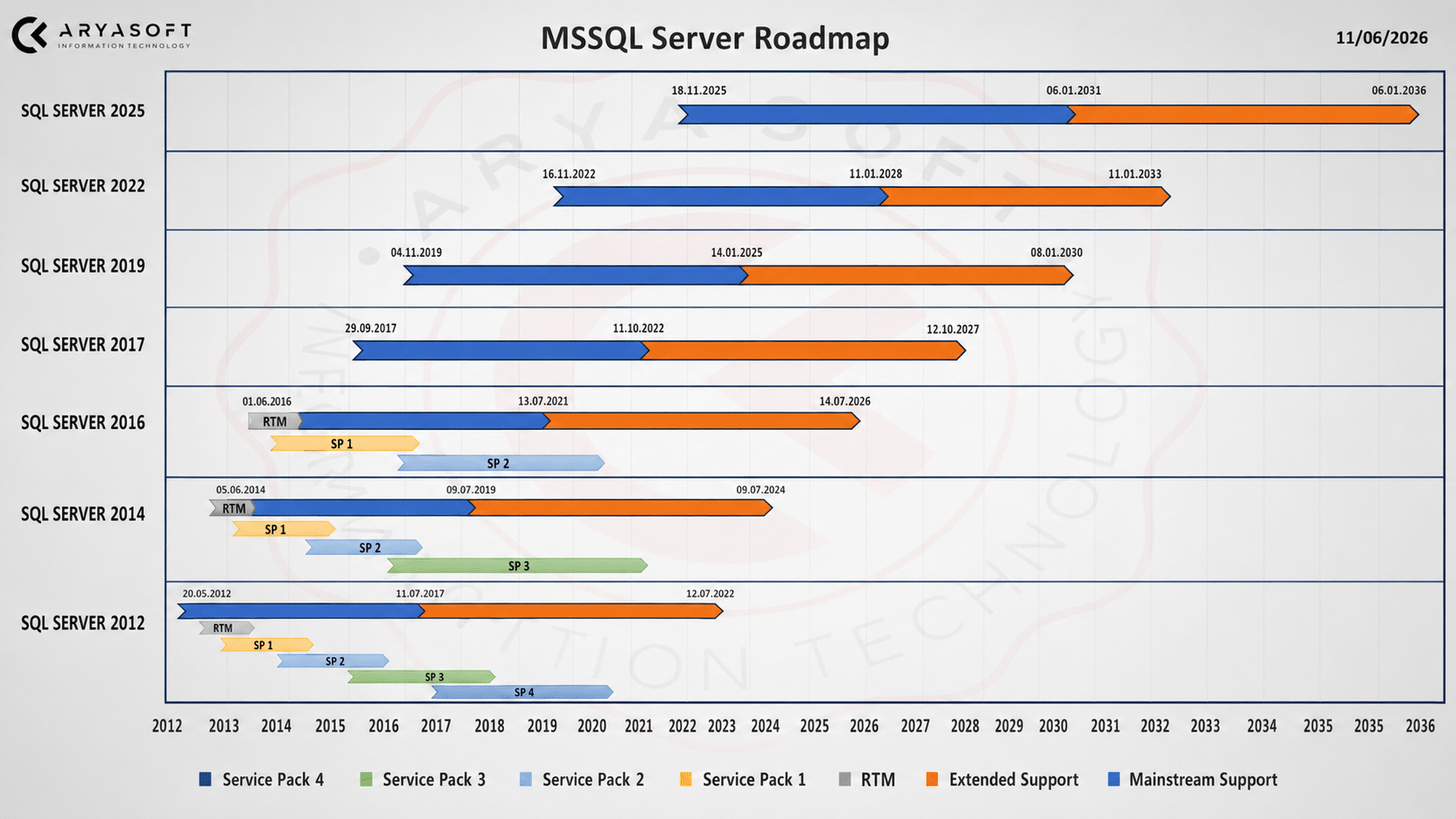
Microsoft supports SQL Server versions on a fixed lifecycle: first mainstream support, which brings new features and fixes, then extended support, which brings security updates only. Once extended support ends, a version can only keep receiving security patches through paid Extended Security Updates (ESU).
| Version | Mainstream support ends | Extended support ends | Status today |
|---|---|---|---|
| SQL Server 2025 | 7 January 2031 | 7 January 2036 | Current version |
| SQL Server 2022 | 11 January 2028 | 11 January 2033 | In mainstream support |
| SQL Server 2019 | 28 February 2025 | 8 January 2030 | Security updates only |
| SQL Server 2017 | 11 October 2022 | 12 October 2027 | Security updates only |
| SQL Server 2016 | 13 July 2021 | 14 July 2026 | Out of support (ESU until July 2029) |
| SQL Server 2014 | 9 July 2019 | 9 July 2024 | Out of support (ESU until July 2027) |
Warning
Extended support for SQL Server 2016 and 2014 has ended. Unless you buy ESU, these versions get no patches for new security vulnerabilities. An out-of-support version also causes growing problems in cyber insurance, audit and regulatory reviews. If you’re on one of them, the time to plan the upgrade has already passed.
Which Version for a New Installation?
- SQL Server 2025: the version with the longest support life. If your application vendor supports 2025, it should be the first choice for new installations.
- SQL Server 2022: mature, with many cumulative updates behind it and mainstream support until 2028. It’s the safe choice if your application vendor hasn’t certified 2025 yet.
- SQL Server 2019: not recommended for new installations; its mainstream support ended in 2025.
Many organizations run ERP systems such as Microsoft Dynamics or regional ERP products on SQL Server. In that case the vendor’s support matrix decides: before upgrading SQL Server, confirm that the vendor supports that version and compatibility level.
What Changed in SQL Server 2025?
- AI and search: a built-in vector data type and vector search functions for semantic search and RAG scenarios inside the database.
- Developer features: a native JSON data type and regular expression functions.
- Concurrency: optimized locking means fewer locks and less blocking.
- Backups: more efficient backup compression with the ZSTD algorithm.
- New in Standard edition: Resource Governor and Power BI Report Server are now available in Standard; Standard’s hardware limits rose to 32 cores and 256 GB.
- Security defaults: the new drivers installed with it encrypt connections by default; older connections and linked servers may need certificate settings.
Our SQL Server 2025 upgrade guide covers the migration in detail.
Choosing an Edition
The SQL Server 2025 editions and their main limits:
| Edition | Compute limit | Buffer pool limit | Who it’s for |
|---|---|---|---|
| Enterprise | Operating system maximum | Operating system maximum | Large, critical workloads; full Always On, readable secondaries |
| Standard | Lesser of 4 sockets or 32 cores | 256 GB | Most mid-sized business applications and ERP |
| Express | Lesser of 1 socket or 4 cores | 1,410 MB; 50 GB per database | Small applications, embedded scenarios |
| Developer (Enterprise Developer, Standard Developer) | Same as the matching edition | Same as the matching edition | Free; development and testing only, not for production |
Web edition ends with SQL Server 2025; it remains available for 2022 and earlier through hosting providers.
If Express is on your shortlist, our SQL Server Express guide shows how to check its limits with T-SQL, back up without SQL Server Agent and decide when to move to Standard.
Note
Standard edition’s 2025 limits remove the need for Enterprise in many organizations. What usually does require Enterprise: Always On groups with several databases and readable secondaries, needing more than 32 cores or a buffer pool above 256 GB, and requirements for uninterrupted maintenance such as online index operations.
For licensing models, prices and ways to cut costs, see our SQL Server licensing guide.
On-Premises or Cloud?
The platform is part of the version decision too:
- On-premises or virtual machine: full control, the ability to use existing licenses, and compliance with data residency requirements.
- Azure SQL Managed Instance: very high SQL Server compatibility; backups, patching and high availability are managed by the platform.
- Azure SQL Database: a fully managed, single-database service suited to new, cloud-native applications.
In regulated sectors such as banking, primary and secondary systems may have to stay within the country; clarify these requirements before deciding on a platform.
Decision Checklist
- The SQL Server versions and compatibility levels supported by the application or ERP vendor are confirmed.
- The support dates of the chosen version cover the planned life of the server.
- The edition is chosen for the real core, memory and high availability needs.
- Licensing models (per core, Server+CAL, subscription) are compared on cost.
- An upgrade schedule exists for out-of-support versions.
Related Reading
- SQL Server 2025 Licensing Guide: Editions, Core vs. CAL, Pricing and Cost Optimization
- SQL Server 2025 Upgrade Guide: Upgrade Paths, Breaking Changes and a Step-by-Step Plan
- SQL Server Always On: Availability Groups and Failover Cluster Instances Explained
- How Many CPU Cores Can SQL Server Use? Edition Limits, Offline Schedulers and VM Pitfalls
SQL Server Consulting
Make the version and edition decision with data
Aryasoft’s senior DBA team evaluates your workload, application support, licensing cost and high availability needs together, and prepares the installation or upgrade plan end to end.