TABLE OF CONTENTS
- •SQL Server 2014 would be better for you if…
- •SQL Server 2016 would be better for you if…
- •SQL Server 2017 would be better for you if…
- •Need expert support for SQL Server?
- •SQL Server 2019 would be better for you if…
- •SQL Server 2022 would be better for you if…
- •SQL Server 2025 would be better for you if…
- •So what’s the right SQL Server version?
- •Need SQL Server consulting support?
- •Planning to Modernize Your SQL Server Environment?
Wait! Before you install that next SQL Server, hold up. Are you sure you’re using the right SQL Server version?
I know, management may want you to stay on an older build, and the vendor may say they only support older SQL Server versions. But if you’re planning a new SQL Server installation, upgrade, migration or modernization project, this is your chance to make the case for a newer version.
This guide walks through SQL Server 2014, 2016, 2017, 2019, 2022 and 2025, with a practical look at when each version makes sense and when it may be time to move on.
SQL Server 2014 would be better for you if…
- You’re dealing with an application whose newest supported version is only SQL Server 2014, but not 2016 or newer.
- You want to use Always On Availability Groups, but I’m even hesitant to put that here because they continue to get dramatically better in subsequent versions. I’d just consider this a minimum starting point for even considering AGs.
- You need to encrypt your backups, and you’re not willing to buy a third-party backup tool.
- You use log shipping as a reporting tool, and you have tricky permissions requirements because newer server-level roles can make this easier.
- You need faster performance without changing the code, and you have lots of time to put into testing. SQL Server 2014’s Cardinality Estimator changes made for different execution plans, but they’re not across-the-board better. You still have to test carefully, find the queries that may get slower and figure out how to mitigate those.
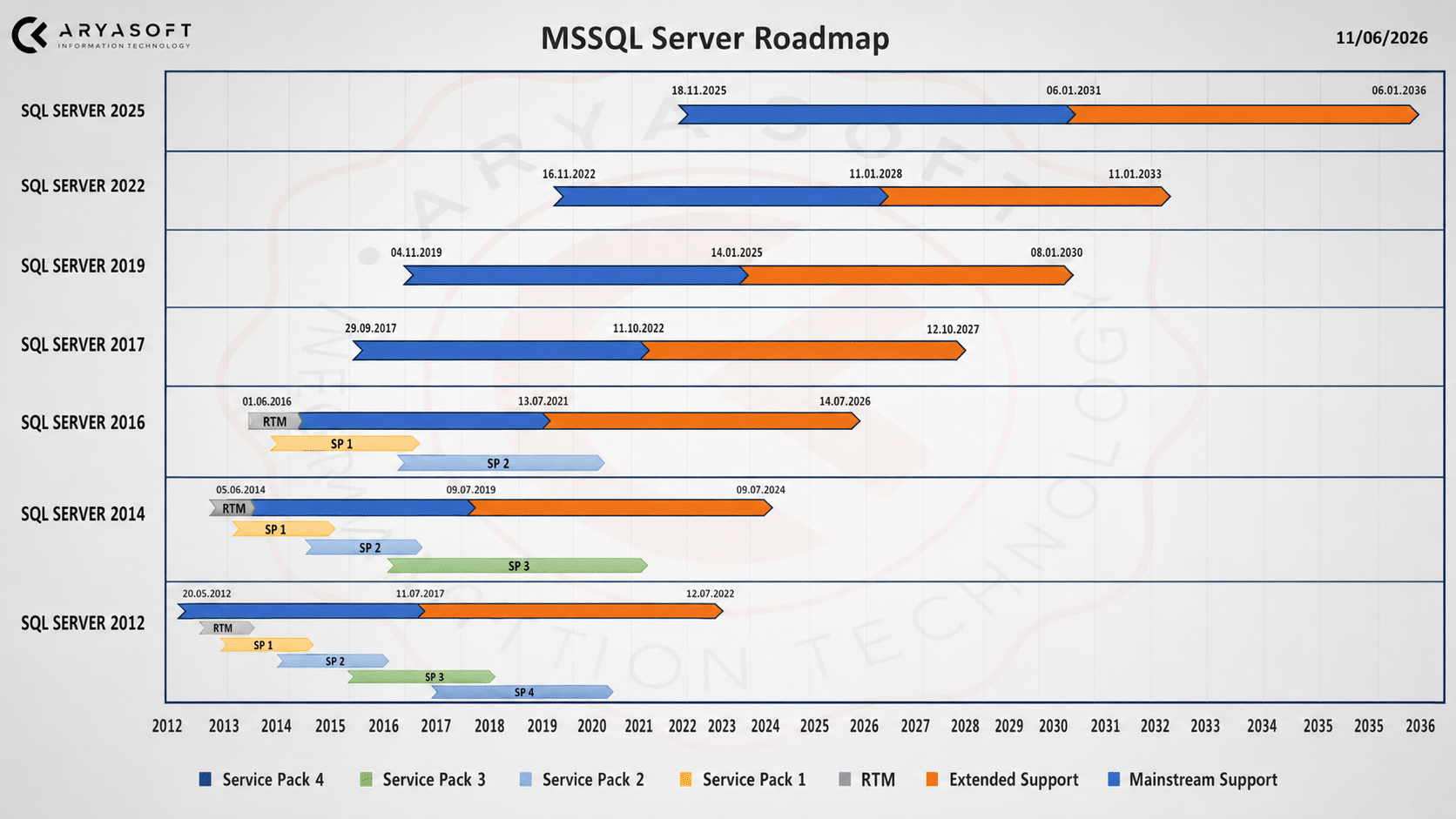
In all, I just can’t recommend SQL Server 2014 for new installs today. Extended support has already ended, so it should only stay in the conversation when application compatibility leaves you with no other choice.
SQL Server 2016 would be better for you if…
- You’re an independent software vendor (ISV) – because SQL Server 2016 Service Pack 1 gave you a lot of Enterprise features in Standard Edition. This meant you could write one version of your application that worked at both your small clients on Standard and your big clients on Enterprise.
- You want an extremely well-known, well-documented product – it’s pretty easy to find material off the shelf and hire people who know how to use the tools in this version.
- You use Standard Edition – because it supports 128GB RAM and can go beyond that for some internal operations like query plans.
- You have compliance needs for an existing application – SQL Server 2016 added Always Encrypted, Dynamic Data Masking, Row-Level Security and temporal tables, which can help protect and track valuable data. It’s still not easy, but it is easier.
- You want to use columnstore indexes – I’m going to call this the minimum version I’d start with because they were finally updatable and could have both columnstore and rowstore indexes on the same table.
- You need query plan monitoring, and you can’t afford a third-party tool – because Query Store gives you useful performance troubleshooting capabilities.
SQL Server 2016 is familiar and widely understood, but it is not a strong choice for new installations in 2026. Its extended support ends in July 2026, so any new deployment should include a clear upgrade or migration plan.
SQL Server 2017 would be better for you if…
- You’re willing to apply patches regularly – because even though it’s an older version, staying current with supported Cumulative Updates still matters.
- You have a zero-RPO goal and financial risks – because SQL Server 2017 added a minimum commit replica setting on Availability Groups that can help guarantee commits were received by multiple replicas.
- You want easier future upgrades – because starting with 2017, you can have a Distributed Availability Group with different versions of SQL Server in it. DAGs aren’t always simple or well-documented, but the idea can help with upgrade planning.
- You need high-performance columnstore queries – because SQL Server 2017 brought useful improvements for batch mode execution plans.
- You’re set on running SQL Server on Linux – but make sure you go through the release notes and understand the operational differences before choosing this route.
- You’re set on doing machine learning and R in SQL Server – but remember that SQL Server licensing costs can make this an expensive place to run those workloads.
It’s still tough to make a strong case for SQL Server 2017 for a new installation. The features are not compelling enough today, and many teams will usually be better served by either staying on a conservative supported version or moving to SQL Server 2019, 2022 or 2025.
Need expert support for SQL Server?
Our senior database team supports SQL Server performance tuning, health checks, migrations, Remote DBA services and urgent operational issues.
SQL Server 2019 would be better for you if…
- You want a mature and widely adopted SQL Server version – SQL Server 2019 has been around long enough for many teams to understand its behavior, issues and best practices.
- You want a reasonable support runway – SQL Server 2019 extended support continues until 2030, which can still be enough for many existing environments.
- You’re comfortable with careful load and performance testing – because 2019 adds a lot of performance features when you enable 2019 compatibility mode, but it can also change execution plans.
- You heavily rely on user-defined functions – because SQL Server 2019 can dramatically speed those up in some cases, although you still need to test carefully.
- You want a stable upgrade target without jumping to the newest release – for many organizations, SQL Server 2019 can still be a practical middle ground.
SQL Server 2019 is still a good option for many environments, especially when application certification, vendor support or operational maturity matters. However, for new SQL Server installations, you should also compare it against SQL Server 2022 and SQL Server 2025 before making the final decision.
SQL Server 2022 would be better for you if…
- You need a longer support lifecycle than SQL Server 2019 – SQL Server 2022 is supported until 2033, while SQL Server 2019 support ends in 2030.
- You want a modern but not brand-new SQL Server version – SQL Server 2022 is newer than 2019 but has also had time to mature through multiple updates.
- You’re willing to apply patches regularly – newer versions continue to receive important fixes, so your patching process needs to be disciplined.
- You have a strong testing process – especially if you want to use newer optimizer and performance features. You need to know which queries improve, which ones slow down and how to mitigate risk.
- Your disaster recovery strategy includes Azure – SQL Server 2022 introduced stronger cloud-connected scenarios, which may matter if Azure is part of your long-term platform strategy.
- You want a stronger long-term default than 2019 – for many organizations, SQL Server 2022 now offers a better balance between support lifespan, stability and modern capabilities.
If I were choosing a SQL Server version for many new production deployments today, SQL Server 2022 would usually be one of the first options I would evaluate. It offers a strong balance between support lifespan, maturity and modern SQL Server features.
SQL Server 2025 would be better for you if…
- You need the absolute longest support lifecycle – SQL Server 2025 extended support continues until 2036.
- You are planning a new long-term platform – if you are building something that needs to last for years, SQL Server 2025 may be worth evaluating from the beginning.
- You want to explore newer AI-ready database capabilities – SQL Server 2025 introduces features such as vector data type, vector functions and vector index capabilities for modern AI and similarity search scenarios.
- You have a strong testing and validation process – because with any new major SQL Server release, you need extra time for compatibility checks, performance testing and operational validation.
- You have access to experienced SQL Server consultants or internal DBA expertise – newer versions can be powerful, but they require careful planning, especially for mission-critical environments.
SQL Server 2025 is exciting, especially for organizations thinking about long-term modernization and AI-ready data platforms. But for critical production environments, don’t treat “newest” as automatically “best.” Test it properly, validate your application behavior and plan the rollout carefully.
So what’s the right SQL Server version?
There isn’t one universal answer. The right SQL Server version depends on your application support requirements, security needs, performance goals, upgrade timeline, internal DBA capacity and long-term data strategy.
For most new SQL Server installations in 2026, SQL Server 2022 makes a strong case as a balanced production choice. SQL Server 2019 can still make sense for mature environments with specific compatibility or vendor requirements. SQL Server 2025 is worth evaluating for new long-term projects, especially where AI-ready data capabilities and extended support lifespan matter.
On the other hand, SQL Server 2014 and SQL Server 2016 should generally be avoided for new installations unless application constraints leave you with no realistic alternative.
Need SQL Server consulting support?
Aryasoft provides SQL Server consulting services for organizations that need stable, secure and high-performing database environments. Our SQL Server expertise covers performance optimization, administration, high availability, backup and recovery, migration planning, security and ongoing operational management.
Whether you are planning a SQL Server upgrade, reviewing your current database environment or deciding between SQL Server 2019, 2022 and 2025, Aryasoft can help you choose the right path with less operational risk.
Need SQL Server consulting? Contact Aryasoft to discuss your database environment and upgrade planning needs.
Related Reading
SQL Server Consulting
Planning to Modernize Your SQL Server Environment?
Aryasoft supports SQL Server assessments, upgrades, migrations, consolidation, performance improvements and architecture planning with senior database expertise.