



Keep Your Business Secure Using SQL Agent Notifications
Category: Reliability
SQL Server Agent allows you to run a wide variety of tasks within SQL Server.
The built-in notification system allows you to identify operators and communicate with them when a job fails.
It is better to be able to provide a solution quickly when an Agent job fails than to have someone else realize it has failed.
How to List All Agent Jobs Without Notification?
You can use the following TSQL script to get a list of job names.
SELECT j.[name] AS [JobName]

FROM [msdb].[dbo].[sysjobs] j

LEFT JOIN [msdb].[dbo].[sysoperators] o

ON (j.[notify_email_operator_id] = o.[id])

WHERE j.[enabled] = 1

AND j.[notify_level_email] NOT IN (1, 2, 3)
How can you resolve this problem?
First, make sure you have configured the Database mail and operator.
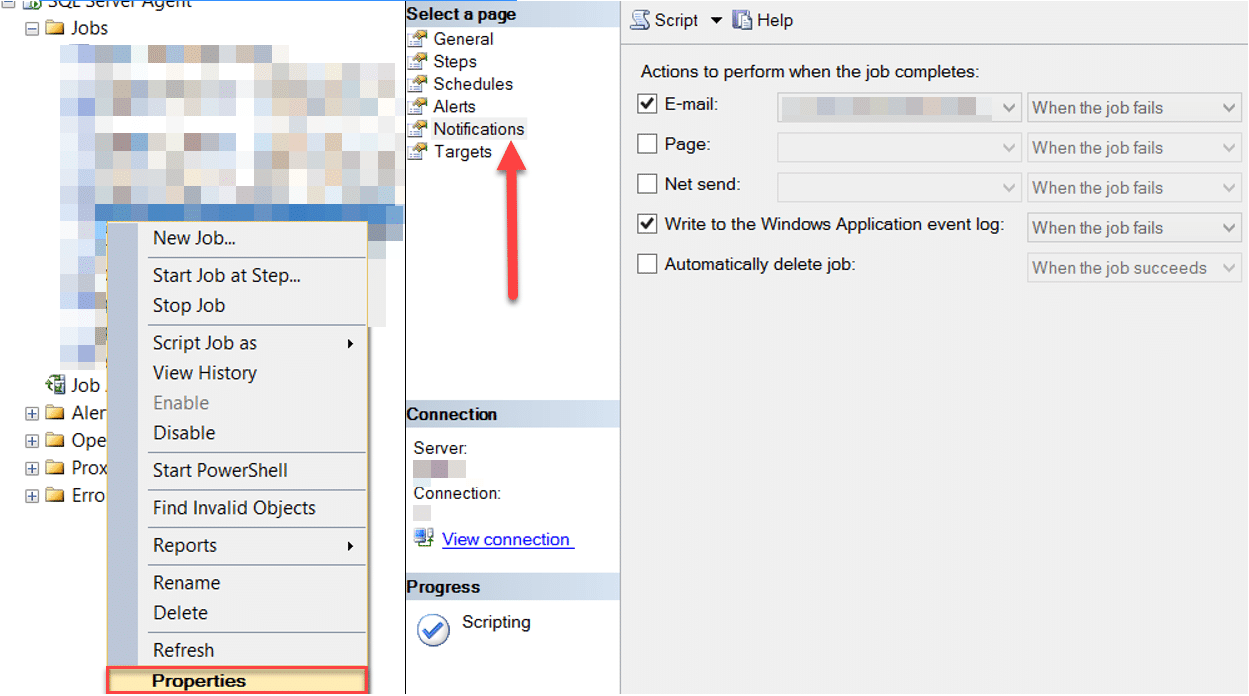
Then, update the SQL Server Agent jobs to enable job error notification:
- Open SQL Server Management Studio.
- Click SQL Server Agent, expand Jobs and right-click.
- Go to Notifications tab and click to enable Email.
- Select Correct Operator a
Explore ServicesSQL Server Consulting
Need expert support for SQL Server?
Our senior database team supports SQL Server performance tuning, health checks, migrations, Remote DBA services and urgent operational issues.
nd select “When the job fails”.
You can also use the following TSQL script to create a change script for all jobs without email notification. Modify @notify_email_operator_name only as needed.
USE MSDB

GO

SELECT

'EXEC msdb.dbo.sp_update_job @job_name=[' + name + '],

@notify_level_email=2,

@notify_email_operator_name=N''DBA Alerts'';

' Command_to_execute

FROM MSDB.dbo.sysjobs

WHERE [Notify_Level_Email] = 0

AND [Enabled] = 1
Komut dosyasının örnek olarak üreteceği kod:
EXEC msdb.dbo.sp_update_job @job_name=[JOBNAME1],

@notify_level_email=2,

@notify_email_operator_name=N'DBA Alerts';


EXEC msdb.dbo.sp_update_job @job_name=[JOBNAME2],

@notify_level_email=2,

@notify_email_operator_name=N'DBA Alerts';


EXEC msdb.dbo.sp_update_job @job_name=[JOBNAME3],

@notify_level_email=2,

@notify_email_operator_name=N'DBA Alerts';
Review and run the output script to apply the change.
Related Reading
SQL Server Managed DBA Services
Let Us Handle Your Day-to-Day SQL Server Operations
Aryasoft’s Remote DBA team manages maintenance plans, job/agent administration and ongoing server operations proactively.


