



How Many CPU Cores Can Your SQL Server Use?
Category: Performance
What Is a CPU Scheduler in SQL Server?
A query you want to execute represents a task — that is, your work. The execution context of your work is called a worker.
A task is assigned to a worker, which is assigned to a scheduler for execution on the CPU.
The manager of what happens on the CPU is called the scheduler, and there’s one for every logical processor.
Why should you care about this?
You have CPUs, you’re paying for them, but your SQL Server might not be using all of them to handle a workload.
Some CPU cores might not be accessible to SQL Server because of licensing constraints.
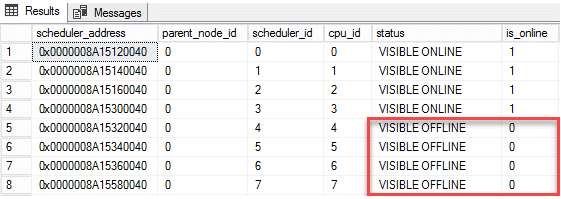
How do you check whether any CPU schedulers are offline?
You can use the following query. sys.dm_os_schedulers returns 0 for a scheduler when it’s disabled.
SELECT * FROM sys.dm_os_schedulers WHERE scheduler_id < 255
How to Fix Disabled Schedulers
Do you know your licensing limits?
Every edition of SQL Server has a maximum number of sockets (or physical processors, or processor packages) and a maximum number of cores.
Need expert support for SQL Server?
Our senior database team supports SQL Server performance tuning, health checks, migrations, Remote DBA services and urgent operational issues.
Check your SQL Server edition’s capacity limits.
If you’re using affinity masking, make sure you know what you’re doing.
Don’t configure CPU affinity at the Windows OS level and then also configure the affinity mask in SQL Server.
You can end up with unpredictable results.
SQL Server CPU affinity is best configured using the sp_configure option in SQL Server.
If you’re using virtualization, consider increasing the number of cores per virtual socket — this can sometimes be a simple software change.
Related Reading
SQL Server Consulting
Do You Need Expert Support for Your SQL Server Environment?
Aryasoft’s senior database team provides end-to-end consulting, from SQL Server performance tuning to architecture decisions.

