



Why Owners of SQL Agent Jobs Should Matter?
Category: Security
When users leave the job;
The job may stop working when login is disabled, deleted or Active Directory is unavailable.
Best practices recommend that you set all job owners to SA account.
Note: You may have a different approach, such as creating accounts or logins specifically for SQL Agent Jobs.
How to Verify Owner on All SQL Server Agent Jobs?
You can use the following query to check the jobs and owners.
SELECT sj.name AS [Job Name],

sj.[description] AS [Job Des
cription],

SUSER_SNAME(sj.owner_sid) AS [Job Owner],

sj.date_created AS [Date Created],

sj.[enabled] AS [Job Enabled],

sc.name AS [Category Name]

FROM msdb.dbo.sysjobs AS sj WITH (NOLOCK)

INNER JOIN msdb.dbo.syscategories AS sc WITH (NOLOCK)

ON sj.category_id = sc.category_id

ORDER BY sj.name OPTION (RECOMPILE);
How to change the Owner of SQL Server Agent Jobs?
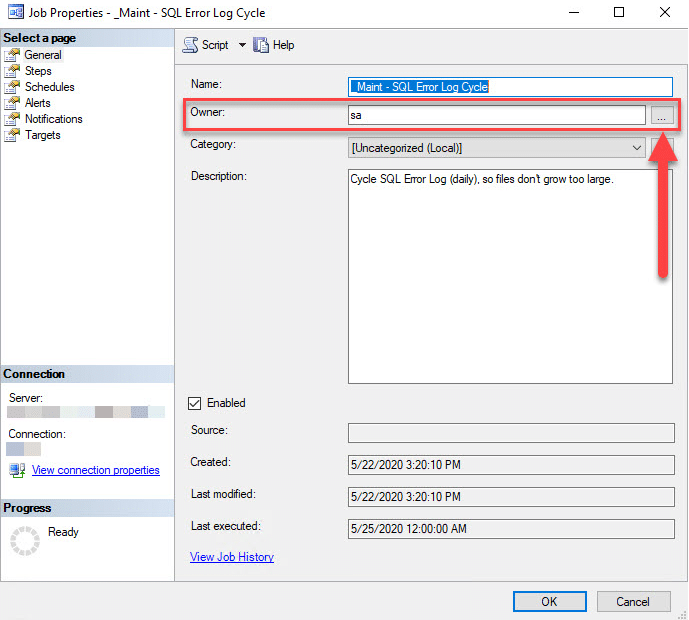
- Click on Agent SERVER using SSMS
- Open Jobs and go to Job and right click properties.
- Change property owner to SA.
SQL Server Consulting
Need expert support for SQL Server?
Our senior database team supports SQL Server performance tuning, health checks, migrations, Remote DBA services and urgent operational issues.
Related Reading
SQL Server Managed DBA Services
Let Us Handle Your Day-to-Day SQL Server Operations
Aryasoft’s Remote DBA team manages maintenance plans, job/agent administration and ongoing server operations proactively.


